

We provide APIs to perform Authentication and EKYC using Aadhaar as the first factor and OTP/BIOMETRIC data being the second factor.
Get OTP
GET {{base_url}}/aadhaar/otp/< aadhaar_number >
Params:
✶ aadhaar_number:
Aadhaar number of resident/end-customer.
Success Response:
{
    "info": "SUCCESS",
    "status": "y",
    "Description": "One time password has been sent to registered mobile number/e-Mail.",
    "Code": "159b3ccbc7054f2e865a3692db5db715",
    "RRN": "710201525439",
    "registered_email": "ch*******@gmail.com",
    "resgistered_phone": "*******2884",
    "timestamp": "2017-04-12T01:51:57"
}
Error Response Example:
{
    "statusCode": 400,
    "errors":
        [
            {
            "statusCode": 400,
            "error": "Bad Request",
            "message": "Invalid Aadhaar Number"
            }
        ],
    "message": "Invalid Aadhaar Number",
    "resultCode": "n",
    "Code": "NA"
}
Note: “errors” contains array of errors in case more that one.
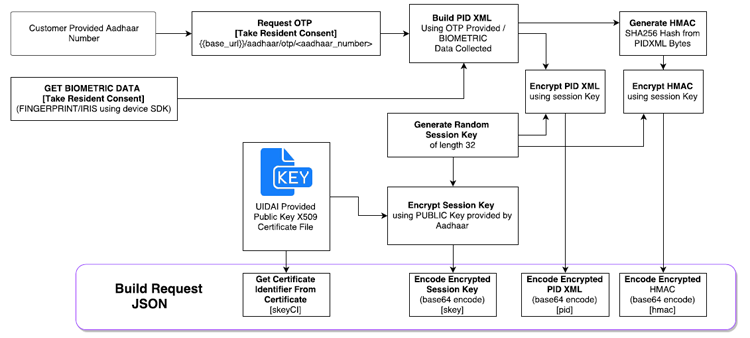
The OTP provided by the user via app/website is then used to build the PID XML required for building.
GET BIOMETRIC DATA
Biometric data can be retrieved using the SDK provided by biometric device provider in form of a byteArray. This data then can be used to build the PID XML for Authentication of the user.
STQC Certified devices implement “Aadhaar Biometric SDK API”. This makes it easy for developers to follow a common approach towards getting data from Biometric Devices.
Recently UIDAI has rolled out new specifications for Registered Devices which will allow developers to directly getting PID, HMAC, SKEY from the biometric device using device APIs/SDK. This will remove any encryption handling of biometric data by Application.
Perform Authentication/eKYC
Request:
[POST] {{base_url}}/aadhaar/new
Request Header (Set below key and value in request header)
QT_API_KEY: < < jwt_access_api_token_provided_to_api_consumers > >
Request Body (application/json):
{
    requestType: '6',
    aadhaarNumber : '65xxxxxxx80',
    requestTimestamp : 'timestamp here',
    residentConsent : 'Y',
    mobileEmailConsent : 'Y',
    uniqueDeviceCode : 'MKHxxxxxxxxHJKJH',
    locationType : 'G',
    locationValue : '22.012,44.824,0.0',
    biometricDeviceModel : 'NA',
    pid: 'ENCRYPTED_ENCODED_PID_DATA_WILL_BE_HERE',
    skeyCI : '20210708',
    skey : 'ENCRYPTED_ENCODED_SESSION_KEY',
    hmac : 'ENCRYPTED_ENCODED_HMAC',
    localLanguageData : 'N'
}
Request Parameters:
✶ aadhaarNumber:
Aadhaar number of resident/end-customer.
✶ requestType:
Type of transaction to be performed. (use numeric value)
☛ ENUM Values:
- IRIS_EKYC’,
- IRIS_AUTH’,
- ‘FINGERPRINT_EKYC’,
- ‘FINGERPRINT_AUTH’,
- ‘OTP_EKYC’,
- ‘OTP_AUTH’,
- ‘DEMOGRAPHIC_AUTH’
✶ requestTimestamp:
time of request generation at client.
☛ Format: “yyyy-MM-dd’T’HH:mm:ss”
✶ residentConsent:
To be set as Y via checkbox when customer’s consent is being taken. [Hardcoding it as ‘Y’ is not allowed as per compliance]
✶ mobileEmailConsent:
To be set as Y via checkbox when customer’s consent is being taken. The separate checkbox is not required if mobile and email consent is included as part of the residentConsent text. [Hardcoding it as ‘Y’ is not allowed as per compliance]
✶ uniqueDeviceCode:
IMEI in case of mobile device, Mac Address in case of Server/ Desktop.
✶ locationType:
Type of location data being sent.
☛ G : Geographic data (usually in case of mobile devices)
☛ P: Pin Code (for fixed systems like servers/desktops)
✶ locationValue:
Value of location data based on locationType.
☛ If G then “lat,lon,alt” comma separated string.
☛ If P then pin code of the area where the device is located.
✶ biometricDeviceModel (optional):
Device model Id of the biometric device being used.
pid: Encrypted and Encode PID block constructed at the client end. [PID XML contains Biometric, OTP or Demographic data used for authentication and is encrypted using session key generated randomly for each transaction and then encoded into base64 string]
✶ skeyCI:
UIDAI public Certificate Identifier. [Derived from the public certificate provided by UIDAI]
✶ skey:
Session Key used to encrypt pid and hmac data. [Session key is encrypted using the public key provided by UIDAI and then encoded into base64 string]
✶ hmac:
SHA256Hash value of pidxml bytes. [This hash is then encrypted using skey and then base64 encoded.]
✶ localLanguageData (optional):
Set as ‘Y’ if need resident’s information in local language as submitted by resident during Aadhaar Registration.
KYC Success Response JSON:
{
    User_Id: 'OUR SYSTEM USER ID',
    Aadhar_Id: '655XXXXXXXXX',
    e_Kyc: {
        status: 'y',
        Description: 'Authenticated Successfully',
        Code: '124be446983XXXXXXXXXXXXXXX',
        RRN: '6345XXXXXXXX',
        Poi: {
            Name: 'RESIDENT NAME HERE',
            Dob: 'DD-MM-YYYY',
            Gender: 'M',
            Phone: '77699XXXXX'
        },
        Poa: {
            co: 'S/O: TEST NAME',
            house: 'ward no. 007',
            street: 'street name',
            landmark: 'landmark provided to Aadhaar',
            lc: 'locality',
            vtc: 'Panna',
            subdist: 'sub-district',
            dist: 'district',
            state: 'state name',
            pc: 'pin code',
            po: 'postal code',
            uidtag: 'AAPKA AADHAAR',
            email: 'email_id_value'
        },
        Ldata: {
            lang: '',
            Name: '',
            co: '',
            house: '',
            street: '',
            landmark: '',
            loc: '',
            vtc: '',
            subdist: '',
            dist: '',
            state: '',
            pc: '',
            po: '',
            luidtag: ''
        },
        Photo: 'base-64-image-data-here'
    },
    transactionId: 'QT-6559XXXXXXX-OXXXXXXXX',
    time: '12/10/2016, 12:17:22 PM'
}
Address Data Points:
1.Element: Poa
This element contains resident’s address within Aadhaar system.
☛ Attributes:
- co – “Care of” person’s name if any
- house – House identifier if any
- street – Street name if any
- lm – Landmark if any
- loc – Locality if any
- vtc – Name of village or town or city
- subdist – Sub-District name
- dist – District name
- state – State name
- pc – Postal pin code
- po – Post Office name if any
2.Element: LData
This element contains resident’s name and address in local Indian language which was used while last data update. This is returned only if “lr” attribute in the API input XML is set to “Y”.
☛ Attributes (all data in Indian local language):
- lang – Local language code (see table below)
- name – Name of the resident
- co – “Care of” person’s name if any
- house – House identifier if any
- street – Street name if any
- lm – Landmark if any
- loc – Locality if any
- vtc – Name of village or town or city
- subdist – Sub-District name
- dist – District name
- state – State name
- pc – Postal pin code
- po – Post Office name if any
AUTH Success Response JSON:
{
    {
    "User_Id": "<<SYSTEM USER ID>>",
    "Aadhar_Id": "433xxxxx912",
    "Auth": {
    "info": "SUCCESS",
    "status": "y",
    "Description": "Authenticated Successfully",
    "Code": "cc66a6d5bec04xxxxxxxxxxxxxbb4153",
    "RRN": "635xxxx62846"
    },
    "transactionId": "QT-433xxxxx912-O1612247637",
    "time": "12/24/2016, 12:42:57 PM",
}
KYC/AUTH Error Response JSON FORMAT:
{ "statusCode": 400, //ERROR CODE FROM SERVICE
  "errors": [ //In case of multiple errors, check this for multiple messages.
    { "statusCode" : 400,
      "error" : "Bad Request",
      "message" : "OTP validation failed"
    } ],
  "message" : "OTP validation failed",
  "resultCode": "400", //ERROR CODE FROM UIDAI
  "Code": "2ecd287d9f774b4bbe7de701263e7a92",
  "RRN": "704418326186",
  "info": "02{4a8196a9003e0b9f7b3c7ce1facfa3d801ac3d3f27a64ea0c2c302574d3dd931,0000000000000000000000000000000000000000000000000000000000000000,0100000200000000,1.0,20170213182220,0,0,0,1.6,c9d33ee5492c46b0a21857d003c758b0fceeb3ef3750293bfbb600aea80ee2cf,411a1ec545675a21b8898ba2c439341b51abfb62246db58f1b4acc1dcf03836c,0000892001,G,17.387|78.491|0.0,NA,NA,NA,NA,NA,NA,NA,NA,NA,NA,efa1f375d76194fa51a3556a97e641e61685f914d446979da50a551a4333ffd7}"
}